<?xml version="1.0" encoding="utf-8"?>
<feed xmlns="http://www.w3.org/2005/Atom">

  <title><![CDATA[Arnab Chakraborty]]></title>
  <link href="http://arnab.ch/atom.xml" rel="self"/>
  <link href="http://arnab.ch/"/>
  <updated>2012-09-30T21:38:39+05:30</updated>
  <id>http://arnab.ch/</id>
  <author>
    <name><![CDATA[Arnab Chakraborty]]></name>
    
  </author>
  <generator uri="http://octopress.org/">Octopress</generator>

  
  <entry>
    <title type="html"><![CDATA[Android - How to send gzipped JSON in HTTP request]]></title>
    <link href="http://arnab.ch/blog/2012/09/android-how-to-send-gzipped-json-in-http-request/"/>
    <updated>2012-09-30T18:41:00+05:30</updated>
    <id>http://arnab.ch/blog/2012/09/android-how-to-send-gzipped-json-in-http-request</id>
    <content type="html"><![CDATA[<p>If you have ever developed an Android application which sends and consumes large amount of JSON data without gzipping then this post is probably for you. This is a very simple optimization technique that you can implement which vastly reduces the network latency and also benefits the users as well as internet. The idea is to transfer less data over the network and once you do that, it improves the speed of your application and helps users by reducing their mobile data usage (i.e saves $$$ in fact).</p>

<!-- more -->


<p>The <a href="http://developer.android.com/reference/android/net/http/AndroidHttpClient.html"><code>AndroidHttpClient</code></a> module offers a way to achieve this, when you&#8217;re sending JSON requests you can gzip the content of the request params and add some necessary HTTP headers, which will provide a hint to your server that it has to decode the content before it is usable. Needless to say that this technique is not just limited to sending JSON, you can of course use it if you&#8217;re sending CSV or text file over the network to server.</p>

<p>I&#8217;ll show a way how this can be done using a Rails backend (that&#8217;s what I use), but I presume this should not be too difficult to implement in case you&#8217;re not using Rails. I&#8217;ll be using JSON as an example here:</p>

<p>To encode or decode the JSON content you can use the following utility module in Android:</p>

<figure class='code'><figcaption><span>util.java</span></figcaption><div class="highlight"><table><tr><td class="gutter"><pre class="line-numbers"><span class='line-number'>1</span>
<span class='line-number'>2</span>
<span class='line-number'>3</span>
<span class='line-number'>4</span>
<span class='line-number'>5</span>
<span class='line-number'>6</span>
<span class='line-number'>7</span>
<span class='line-number'>8</span>
<span class='line-number'>9</span>
<span class='line-number'>10</span>
<span class='line-number'>11</span>
<span class='line-number'>12</span>
<span class='line-number'>13</span>
<span class='line-number'>14</span>
<span class='line-number'>15</span>
<span class='line-number'>16</span>
<span class='line-number'>17</span>
<span class='line-number'>18</span>
<span class='line-number'>19</span>
<span class='line-number'>20</span>
<span class='line-number'>21</span>
<span class='line-number'>22</span>
<span class='line-number'>23</span>
<span class='line-number'>24</span>
<span class='line-number'>25</span>
<span class='line-number'>26</span>
<span class='line-number'>27</span>
<span class='line-number'>28</span>
<span class='line-number'>29</span>
<span class='line-number'>30</span>
<span class='line-number'>31</span>
<span class='line-number'>32</span>
<span class='line-number'>33</span>
<span class='line-number'>34</span>
<span class='line-number'>35</span>
<span class='line-number'>36</span>
<span class='line-number'>37</span>
<span class='line-number'>38</span>
<span class='line-number'>39</span>
<span class='line-number'>40</span>
<span class='line-number'>41</span>
<span class='line-number'>42</span>
<span class='line-number'>43</span>
<span class='line-number'>44</span>
<span class='line-number'>45</span>
<span class='line-number'>46</span>
<span class='line-number'>47</span>
<span class='line-number'>48</span>
<span class='line-number'>49</span>
<span class='line-number'>50</span>
<span class='line-number'>51</span>
<span class='line-number'>52</span>
<span class='line-number'>53</span>
<span class='line-number'>54</span>
<span class='line-number'>55</span>
<span class='line-number'>56</span>
<span class='line-number'>57</span>
<span class='line-number'>58</span>
<span class='line-number'>59</span>
<span class='line-number'>60</span>
<span class='line-number'>61</span>
<span class='line-number'>62</span>
<span class='line-number'>63</span>
<span class='line-number'>64</span>
<span class='line-number'>65</span>
<span class='line-number'>66</span>
<span class='line-number'>67</span>
<span class='line-number'>68</span>
<span class='line-number'>69</span>
<span class='line-number'>70</span>
<span class='line-number'>71</span>
<span class='line-number'>72</span>
<span class='line-number'>73</span>
<span class='line-number'>74</span>
<span class='line-number'>75</span>
<span class='line-number'>76</span>
<span class='line-number'>77</span>
<span class='line-number'>78</span>
<span class='line-number'>79</span>
<span class='line-number'>80</span>
<span class='line-number'>81</span>
<span class='line-number'>82</span>
</pre></td><td class='code'><pre><code class='java'><span class='line'><span class="kd">public</span> <span class="kd">class</span> <span class="nc">Util</span> <span class="o">{</span>
</span><span class='line'>
</span><span class='line'>    <span class="cm">/**</span>
</span><span class='line'><span class="cm">     * Converts an InputStream to String</span>
</span><span class='line'><span class="cm">     * </span>
</span><span class='line'><span class="cm">     * @param is</span>
</span><span class='line'><span class="cm">     * @return</span>
</span><span class='line'><span class="cm">     * @throws IOException</span>
</span><span class='line'><span class="cm">     */</span>
</span><span class='line'>    <span class="kd">public</span> <span class="kd">static</span> <span class="n">String</span> <span class="nf">streamToString</span><span class="o">(</span><span class="n">InputStream</span> <span class="n">content</span><span class="o">)</span> <span class="kd">throws</span> <span class="n">IOException</span> <span class="o">{</span>
</span><span class='line'>        <span class="kt">byte</span><span class="o">[]</span> <span class="n">buffer</span> <span class="o">=</span> <span class="k">new</span> <span class="kt">byte</span><span class="o">[</span><span class="mi">1024</span><span class="o">];</span>
</span><span class='line'>        <span class="kt">int</span> <span class="n">numRead</span> <span class="o">=</span> <span class="mi">0</span><span class="o">;</span>
</span><span class='line'>        <span class="n">ByteArrayOutputStream</span> <span class="n">baos</span> <span class="o">=</span> <span class="k">new</span> <span class="n">ByteArrayOutputStream</span><span class="o">();</span>
</span><span class='line'>
</span><span class='line'>        <span class="k">while</span> <span class="o">((</span><span class="n">numRead</span> <span class="o">=</span> <span class="n">content</span><span class="o">.</span><span class="na">read</span><span class="o">(</span><span class="n">buffer</span><span class="o">))</span> <span class="o">!=</span> <span class="o">-</span><span class="mi">1</span><span class="o">)</span> <span class="o">{</span>
</span><span class='line'>            <span class="n">baos</span><span class="o">.</span><span class="na">write</span><span class="o">(</span><span class="n">buffer</span><span class="o">,</span> <span class="mi">0</span><span class="o">,</span> <span class="n">numRead</span><span class="o">);</span>
</span><span class='line'>        <span class="o">}</span>
</span><span class='line'>
</span><span class='line'>        <span class="n">content</span><span class="o">.</span><span class="na">close</span><span class="o">();</span>
</span><span class='line'>
</span><span class='line'>        <span class="k">return</span> <span class="k">new</span> <span class="nf">String</span><span class="o">(</span><span class="n">baos</span><span class="o">.</span><span class="na">toByteArray</span><span class="o">());</span>
</span><span class='line'>    <span class="o">}</span>
</span><span class='line'>
</span><span class='line'>    <span class="cm">/**</span>
</span><span class='line'><span class="cm">     * Compresses the content of the request parameters (as a string). Sets</span>
</span><span class='line'><span class="cm">     * appropriate HTTP headers also so that the server can decode it properly.</span>
</span><span class='line'><span class="cm">     * </span>
</span><span class='line'><span class="cm">     * @param context Context</span>
</span><span class='line'><span class="cm">     * @param content The string request params, ideally JSON string</span>
</span><span class='line'><span class="cm">     * @param postReq The HttpPost request object</span>
</span><span class='line'><span class="cm">     * </span>
</span><span class='line'><span class="cm">     */</span>
</span><span class='line'>    <span class="kd">public</span> <span class="kd">static</span> <span class="kt">void</span> <span class="nf">setCompressedEntity</span><span class="o">(</span><span class="n">Context</span> <span class="n">context</span><span class="o">,</span> <span class="n">String</span> <span class="n">content</span><span class="o">,</span> <span class="n">HttpPost</span> <span class="n">postReq</span><span class="o">)</span> <span class="o">{</span>
</span><span class='line'>        <span class="k">try</span> <span class="o">{</span>
</span><span class='line'>            <span class="kt">byte</span><span class="o">[]</span> <span class="n">data</span> <span class="o">=</span> <span class="n">content</span><span class="o">.</span><span class="na">getBytes</span><span class="o">(</span><span class="s">&quot;UTF-8&quot;</span><span class="o">);</span>
</span><span class='line'>
</span><span class='line'>            <span class="c1">// if the length of the data exceeds the minimum gzip size then only</span>
</span><span class='line'>            <span class="c1">// gzip it else it&#39;s not required at all</span>
</span><span class='line'>            <span class="k">if</span> <span class="o">(</span><span class="n">content</span><span class="o">.</span><span class="na">length</span><span class="o">()</span> <span class="o">&gt;</span> <span class="n">AndroidHttpClient</span>
</span><span class='line'>                  <span class="o">.</span><span class="na">getMinGzipSize</span><span class="o">(</span><span class="n">context</span><span class="o">.</span><span class="na">getContentResolver</span><span class="o">()))</span> <span class="o">{</span>
</span><span class='line'>                <span class="c1">// set necessary headers</span>
</span><span class='line'>                <span class="n">postReq</span><span class="o">.</span><span class="na">setHeader</span><span class="o">(</span><span class="s">&quot;Content-Encoding&quot;</span><span class="o">,</span> <span class="s">&quot;gzip&quot;</span><span class="o">);</span>
</span><span class='line'>            <span class="o">}</span>
</span><span class='line'>
</span><span class='line'>            <span class="c1">// Compressed entity itself checks for minimum gzip size</span>
</span><span class='line'>            <span class="c1">// and if the content is shorter than that size then it</span>
</span><span class='line'>            <span class="c1">// just returns a ByteArrayEntity</span>
</span><span class='line'>            <span class="n">postReq</span><span class="o">.</span><span class="na">setEntity</span><span class="o">(</span><span class="n">AndroidHttpClient</span><span class="o">.</span><span class="na">getCompressedEntity</span><span class="o">(</span><span class="n">data</span><span class="o">,</span> <span class="n">context</span><span class="o">.</span><span class="na">getContentResolver</span><span class="o">()));</span>
</span><span class='line'>
</span><span class='line'>        <span class="o">}</span> <span class="k">catch</span> <span class="o">(</span><span class="n">UnsupportedEncodingException</span> <span class="n">e</span><span class="o">)</span> <span class="o">{</span>
</span><span class='line'>            <span class="n">e</span><span class="o">.</span><span class="na">printStackTrace</span><span class="o">();</span>
</span><span class='line'>        <span class="o">}</span> <span class="k">catch</span> <span class="o">(</span><span class="n">IOException</span> <span class="n">e</span><span class="o">)</span> <span class="o">{</span>
</span><span class='line'>            <span class="n">e</span><span class="o">.</span><span class="na">printStackTrace</span><span class="o">();</span>
</span><span class='line'>        <span class="o">}</span>
</span><span class='line'>    <span class="o">}</span>
</span><span class='line'>
</span><span class='line'>    <span class="cm">/**</span>
</span><span class='line'><span class="cm">     * Extracts the response content. If the server response is compressed, then</span>
</span><span class='line'><span class="cm">     * it transparently decompresses the content. In order to indicate to server</span>
</span><span class='line'><span class="cm">     * that you can consume JSON response, use the following code to add the &quot;Accept&quot;</span>
</span><span class='line'><span class="cm">     * header:</span>
</span><span class='line'><span class="cm">     *</span>
</span><span class='line'><span class="cm">     * AndroidHttpClient.modifyRequestToAcceptGzipResponse(HttpRequest request)</span>
</span><span class='line'><span class="cm">     * </span>
</span><span class='line'><span class="cm">     * @param response</span>
</span><span class='line'><span class="cm">     *                   HttpResponse Object</span>
</span><span class='line'><span class="cm">     * @return String content of the HttpResponse</span>
</span><span class='line'><span class="cm">     */</span>
</span><span class='line'>    <span class="kd">public</span> <span class="kd">static</span> <span class="n">String</span> <span class="nf">getIfCompressed</span><span class="o">(</span><span class="n">HttpResponse</span> <span class="n">response</span><span class="o">)</span> <span class="o">{</span>
</span><span class='line'>        <span class="k">if</span> <span class="o">(</span><span class="n">response</span> <span class="o">==</span> <span class="kc">null</span><span class="o">)</span>
</span><span class='line'>            <span class="k">return</span> <span class="kc">null</span><span class="o">;</span>
</span><span class='line'>
</span><span class='line'>        <span class="k">try</span> <span class="o">{</span>
</span><span class='line'>            <span class="n">InputStream</span> <span class="n">is</span> <span class="o">=</span> <span class="n">AndroidHttpClient</span><span class="o">.</span><span class="na">getUngzippedContent</span><span class="o">(</span><span class="n">response</span><span class="o">.</span><span class="na">getEntity</span><span class="o">());</span>
</span><span class='line'>            <span class="k">return</span> <span class="nf">streamToString</span><span class="o">(</span><span class="n">is</span><span class="o">);</span>
</span><span class='line'>        <span class="o">}</span> <span class="k">catch</span> <span class="o">(</span><span class="n">IOException</span> <span class="n">e</span><span class="o">)</span> <span class="o">{</span>
</span><span class='line'>            <span class="n">e</span><span class="o">.</span><span class="na">printStackTrace</span><span class="o">();</span>
</span><span class='line'>        <span class="o">}</span>
</span><span class='line'>
</span><span class='line'>        <span class="k">return</span> <span class="kc">null</span><span class="o">;</span>
</span><span class='line'>    <span class="o">}</span>
</span><span class='line'><span class="o">}</span>
</span></code></pre></td></tr></table></div></figure>


<p>The HTTP header, which indicates to server that the request content is gzipped, is <code>Content-Encoding: gzip</code>. On the Rails side you can use the following <strong>Rack</strong> middleware to decode JSON requests (you can set your webserver for example nginx to do the encoding on JSON responses):</p>

<p>A Rack middleware to decode the gzipped JSON, thanks to this <a href="https://gist.github.com/2109707">gist</a> by <a href="https://gist.github.com/relistan">relistan</a>:</p>

<figure class='code'><figcaption><span>compressed_requests.rb</span></figcaption><div class="highlight"><table><tr><td class="gutter"><pre class="line-numbers"><span class='line-number'>1</span>
<span class='line-number'>2</span>
<span class='line-number'>3</span>
<span class='line-number'>4</span>
<span class='line-number'>5</span>
<span class='line-number'>6</span>
<span class='line-number'>7</span>
<span class='line-number'>8</span>
<span class='line-number'>9</span>
<span class='line-number'>10</span>
<span class='line-number'>11</span>
<span class='line-number'>12</span>
<span class='line-number'>13</span>
<span class='line-number'>14</span>
<span class='line-number'>15</span>
<span class='line-number'>16</span>
<span class='line-number'>17</span>
<span class='line-number'>18</span>
<span class='line-number'>19</span>
<span class='line-number'>20</span>
<span class='line-number'>21</span>
<span class='line-number'>22</span>
<span class='line-number'>23</span>
<span class='line-number'>24</span>
<span class='line-number'>25</span>
<span class='line-number'>26</span>
<span class='line-number'>27</span>
<span class='line-number'>28</span>
<span class='line-number'>29</span>
<span class='line-number'>30</span>
<span class='line-number'>31</span>
<span class='line-number'>32</span>
<span class='line-number'>33</span>
</pre></td><td class='code'><pre><code class='ruby'><span class='line'><span class="k">class</span> <span class="nc">CompressedRequests</span>
</span><span class='line'>  <span class="k">def</span> <span class="nf">initialize</span><span class="p">(</span><span class="n">app</span><span class="p">)</span>
</span><span class='line'>    <span class="vi">@app</span> <span class="o">=</span> <span class="n">app</span>
</span><span class='line'>  <span class="k">end</span>
</span><span class='line'>
</span><span class='line'>  <span class="k">def</span> <span class="nf">method_handled?</span><span class="p">(</span><span class="n">env</span><span class="p">)</span>
</span><span class='line'>    <span class="o">!!</span><span class="p">(</span><span class="n">env</span><span class="o">[</span><span class="s1">&#39;REQUEST_METHOD&#39;</span><span class="o">]</span> <span class="o">=~</span> <span class="sr">/(POST|PUT)/</span><span class="p">)</span>
</span><span class='line'>  <span class="k">end</span>
</span><span class='line'>
</span><span class='line'>  <span class="k">def</span> <span class="nf">encoding_handled?</span><span class="p">(</span><span class="n">env</span><span class="p">)</span>
</span><span class='line'>    <span class="o">[</span><span class="s1">&#39;gzip&#39;</span><span class="p">,</span> <span class="s1">&#39;deflate&#39;</span><span class="o">].</span><span class="n">include?</span> <span class="n">env</span><span class="o">[</span><span class="s1">&#39;HTTP_CONTENT_ENCODING&#39;</span><span class="o">]</span>
</span><span class='line'>  <span class="k">end</span>
</span><span class='line'>
</span><span class='line'>  <span class="k">def</span> <span class="nf">call</span><span class="p">(</span><span class="n">env</span><span class="p">)</span>
</span><span class='line'>    <span class="k">if</span> <span class="n">method_handled?</span><span class="p">(</span><span class="n">env</span><span class="p">)</span> <span class="o">&amp;&amp;</span> <span class="n">encoding_handled?</span><span class="p">(</span><span class="n">env</span><span class="p">)</span>
</span><span class='line'>      <span class="n">extracted</span> <span class="o">=</span> <span class="n">decode</span><span class="p">(</span><span class="n">env</span><span class="o">[</span><span class="s1">&#39;rack.input&#39;</span><span class="o">]</span><span class="p">,</span> <span class="n">env</span><span class="o">[</span><span class="s1">&#39;HTTP_CONTENT_ENCODING&#39;</span><span class="o">]</span><span class="p">)</span>
</span><span class='line'>
</span><span class='line'>      <span class="n">env</span><span class="o">.</span><span class="n">delete</span><span class="p">(</span><span class="s1">&#39;HTTP_CONTENT_ENCODING&#39;</span><span class="p">)</span>
</span><span class='line'>      <span class="n">env</span><span class="o">[</span><span class="s1">&#39;CONTENT_LENGTH&#39;</span><span class="o">]</span> <span class="o">=</span> <span class="n">extracted</span><span class="o">.</span><span class="n">length</span>
</span><span class='line'>      <span class="n">env</span><span class="o">[</span><span class="s1">&#39;rack.input&#39;</span><span class="o">]</span> <span class="o">=</span> <span class="no">StringIO</span><span class="o">.</span><span class="n">new</span><span class="p">(</span><span class="n">extracted</span><span class="p">)</span>
</span><span class='line'>    <span class="k">end</span>
</span><span class='line'>
</span><span class='line'>    <span class="n">status</span><span class="p">,</span> <span class="n">headers</span><span class="p">,</span> <span class="n">response</span> <span class="o">=</span> <span class="vi">@app</span><span class="o">.</span><span class="n">call</span><span class="p">(</span><span class="n">env</span><span class="p">)</span>
</span><span class='line'>    <span class="k">return</span> <span class="o">[</span><span class="n">status</span><span class="p">,</span> <span class="n">headers</span><span class="p">,</span> <span class="n">response</span><span class="o">]</span>
</span><span class='line'>  <span class="k">end</span>
</span><span class='line'>
</span><span class='line'>  <span class="k">def</span> <span class="nf">decode</span><span class="p">(</span><span class="n">input</span><span class="p">,</span> <span class="n">content_encoding</span><span class="p">)</span>
</span><span class='line'>    <span class="k">case</span> <span class="n">content_encoding</span>
</span><span class='line'>      <span class="k">when</span> <span class="s1">&#39;gzip&#39;</span> <span class="k">then</span> <span class="no">Zlib</span><span class="o">::</span><span class="no">GzipReader</span><span class="o">.</span><span class="n">new</span><span class="p">(</span><span class="n">input</span><span class="p">)</span><span class="o">.</span><span class="n">read</span>
</span><span class='line'>      <span class="k">when</span> <span class="s1">&#39;deflate&#39;</span> <span class="k">then</span> <span class="no">Zlib</span><span class="o">::</span><span class="no">Inflate</span><span class="o">.</span><span class="n">inflate</span><span class="p">(</span><span class="n">input</span><span class="o">.</span><span class="n">read</span><span class="p">)</span>
</span><span class='line'>    <span class="k">end</span>
</span><span class='line'>  <span class="k">end</span>
</span><span class='line'><span class="k">end</span>
</span></code></pre></td></tr></table></div></figure>


<p>Now put this in somewhere in your Rails web application directory for example <code>lib/middleware</code>, just make sure that the file is loaded when Rails boots. To include the file in Rails&#8217; <strong>autoload</strong> path, add it like this:</p>

<figure class='code'><figcaption><span>application.rb</span></figcaption><div class="highlight"><table><tr><td class="gutter"><pre class="line-numbers"><span class='line-number'>1</span>
</pre></td><td class='code'><pre><code class='ruby'><span class='line'><span class="n">config</span><span class="o">.</span><span class="n">autoload_paths</span> <span class="o">+=</span> <span class="sx">%W(</span><span class="si">#{</span><span class="n">config</span><span class="o">.</span><span class="n">root</span><span class="si">}</span><span class="sx">/lib </span><span class="si">#{</span><span class="n">config</span><span class="o">.</span><span class="n">root</span><span class="si">}</span><span class="sx">/lib/middleware)</span>
</span></code></pre></td></tr></table></div></figure>


<p>Once that is done, then you need to add this tiny little Rack app as a middleware, and the important trick is to add it before the <code>ActionDispatch::ParamsParser</code> middleware in Rails 3:</p>

<figure class='code'><figcaption><span>application.rb</span></figcaption><div class="highlight"><table><tr><td class="gutter"><pre class="line-numbers"><span class='line-number'>1</span>
<span class='line-number'>2</span>
<span class='line-number'>3</span>
</pre></td><td class='code'><pre><code class='ruby'><span class='line'><span class="c1"># Handle Compressed Requests, this middleware makes gzip content </span>
</span><span class='line'><span class="c1"># handling transparent to the Rails stack</span>
</span><span class='line'><span class="n">config</span><span class="o">.</span><span class="n">middleware</span><span class="o">.</span><span class="n">insert_before</span> <span class="no">ActionDispatch</span><span class="o">::</span><span class="no">ParamsParser</span><span class="p">,</span> <span class="s2">&quot;CompressedRequests&quot;</span>
</span></code></pre></td></tr></table></div></figure>


<p>That&#8217;s all you need both on client and server to send and receive Gzipped content. If you&#8217;re sending JSON from client and you wan&#8217;t rails to interpret it as JSON, then don&#8217;t forget to add <code>Content-Type: application/json</code> on your HTTP Request header.</p>

<p>Happy coding! If you have anything to say feel free to contact me on Twitter <a href="http://twitter.com/arnabc">@arnabc</a></p>
]]></content>
  </entry>
  
  <entry>
    <title type="html"><![CDATA[Android auto-updating homescreen application]]></title>
    <link href="http://arnab.ch/blog/2012/01/android-auto-updating-homescreen-application/"/>
    <updated>2012-01-21T00:26:00+05:30</updated>
    <id>http://arnab.ch/blog/2012/01/android-auto-updating-homescreen-application</id>
    <content type="html"><![CDATA[<p>Well, the title of the post may not be descriptive enough of the complexity that we dealt with in one of our recent projects. Before I delve deeper into the actual problem, let me give you some background of what we&#8217;re trying to achieve. We&#8217;ve been working on an Android application for some time which is going to be installed in kiosks or in cabs mainly on Android tablets (currently Android 2.2 devices), basically this is a sort of in-cab entertainment system where you can listen to music, watch videos, latest movie trailers and promos, read latest news, search places and find them in maps. You may think what&#8217;s so complicated about it? Well this app is an Android Homescreen application and this is going to be the only application that users can access from the tablets and above all it&#8217;ll be <strong>remotely managed</strong>.</p>

<p>The term <strong>remotely managed</strong> means that the app will be automatically updated over the air, there will be a provisioning server where the admins can publish/upload a new build, and that build will automatically be installed in the devices. Other than that the device can also be remotely restarted or shut down. The content that users can access or play using the app is stored in the device for faster access, and that content is synced (i.e. updated) periodically from a remote content syncing server. All of these are happening over the internet and the devices are equipped with a 3G chip, which makes it easier to download large amount of data with a decent network speed, else the content syncing would be a real pain. Below is the list of rough requirements that we had:</p>

<ul>
<li>The main app will be the only app which users can access.</li>
<li>Automatic update over the air using a provisioning server.</li>
<li>Sync content from a remote content syncing server.</li>
<li>Report Crashes and device health statuses to the server.</li>
</ul>


<!--more-->


<p>If you look at the requirements above, this ain&#8217;t an easy task and sure it&#8217;s not, we&#8217;re developing the app since last few months and are close to completion, the app is currently being field tested and hopefully it&#8217;ll soon be live out there in the wild.</p>

<p>So the big question is what are the challenges that we faced while we pulled off this effort, the purpose of this blog post is to share some of the findings/knowledge that we&#8217;ve gained over the period of time while developing the app. The ways that we&#8217;ve adopted are not the ones which can be adopted if you&#8217;re going to have your app be distributed through the Android market, our app isn&#8217;t or will not be distributed from the Android market, this is a custom application developed for a very specific/limited set of devices in mind. I&#8217;ll cover each of the requirements mentioned above and will share some of the rough design choices that we made in order to meet the requirements.</p>

<h2>The main app will be the only app which users can access</h2>

<p>There&#8217;s only one way that you can have this kind of application in Android, make your app a homescreen app, so that whenever users press home/back button they&#8217;ll land up right there in your app, and they can&#8217;t get out of it (provided your app is the default one). In order to prevent users from exiting your app, you may need to handle some other stuff like options menu, disable recent items, and may be some extra buttons (some Chinese devices come with extra buttons on 7&Prime; Android tablets) etc. These extra keys can be handled/prevented using Android key handling code.</p>

<h2>Automatic update over the air using a provisioning server</h2>

<p>This is an interesting part, you may be aware of that in Android the automatic update of an app can only happen through Marketplace, there&#8217;s no other way to update an app. But our app is not going to be distributed through Marketplace, so how do we update then? Well there&#8217;s no easy way to do it, and the process is complicated.</p>

<p>First of all, in Android in order to <em>silently install</em> an app, you need special permission called INSTALL_PACKAGES which is a <em>system permission</em> and IS NOT available to apps <em>not signed</em> with system/firmware certificate. This is an issue that we need to get past in order to make it happen, after few days of searching and testing several options, I narrowed it down to the following options:</p>

<ol>
<li><strong>Sign the app with the system certificate</strong> - This was not possible because we couldn&#8217;t procure the certificate from the hardware vendor of our choice.</li>
<li><strong>Install our own Android custom ROM with the app bundled</strong> - This was possible, but it requires more engineering effort as well as taking care of device drivers that manufacturers ship with the device. Other than that there&#8217;s a maintenance effort involved in future where we have to ensure that our custom Android ROM works with at least two to three different devices. So, this too was not a viable solution for us.</li>
<li><strong>Root the device and install the package through code</strong> - This was the last option that I tried and IT WORKED!, after couple of iterations on rooting procedure, I managed to root the device properly.</li>
</ol>


<p>At first I tried the <strong>rageagainstthecage</strong> exploit to root, but it were only able to temporarily root the device and it wouldn&#8217;t survive a reboot. Then I used <strong>psneuter</strong> to root the device and installed <strong>busybox</strong> and the modified <strong>su</strong> binary provided by the excellent guys from <a href="http://shortfuse.org/"><strong>SuperOneClick</strong></a> installer. Along with that I also installed the <a href="https://market.android.com/details?id=com.noshufou.android.su&amp;hl=en">Superuser</a> app to manage the <em>su</em> permissions. Once the rooting procedure is in place it&#8217;s time to move on to code and write an Android service which can automatically install our application.</p>

<h3>Updater Service</h3>

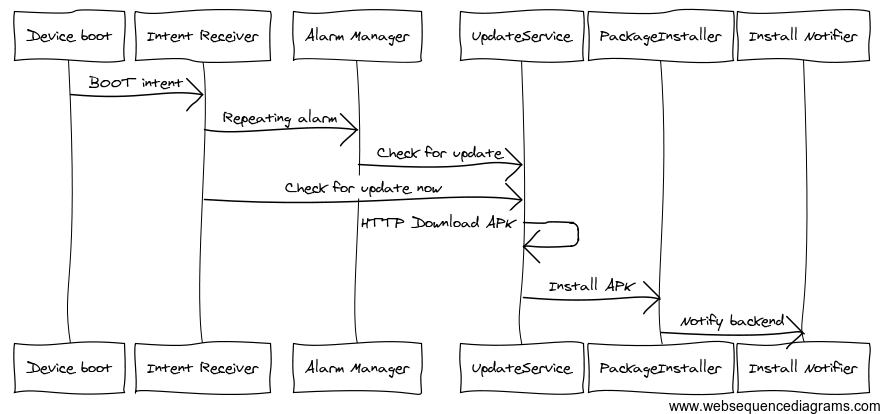
<p>This service is the crux of this application, it acts as a &#8220;remote control&#8221; to manage the device as well as our homescreen application. We decided to build it as a separate app not part of the homescreen application, because this app is not going to have any GUI. So how does this work? Below is the rough diagram of it&#8217;s architecture:</p>

<p><img src="http://arnab.ch/images/updater-service-sequence-diagram.png" alt="Updater Service Sequence Diagram" /></p>

<p>In the above diagram, our Updater app is started whenever the device is rebooted (as per our installation process, we reboot the device after installing the update service app), it sets up a repeating alarm using a <em>PendingIntent</em>, which is invoked after a certain period of time, in the mean time it also makes a quick request to the provisioning server for any available update. If there&#8217;s an update then the UpdateService downloads the APK (link provided in the update check response) and once it&#8217;s downloaded (stored in the SDcard) it then fires up an intent to start the PackageInstaller and gives the APK file path as part of the intent payload. The PackageInstaller then runs the <code>pm install -r &lt;apkPath&gt;</code> command with <code>su</code> privilege. In order to execute the commands as <em>root</em> I used a modified version of the <a href="http://muzikant-android.blogspot.com/2011/02/how-to-get-root-access-and-execute.html">excellent piece of code available from here</a>. Once the installation process is complete we notify the backend server that the device has been updated with the latest app (by the way it may already be clear to you that the provisioning server has the list of devices running in the wild and knows which device is running what version of the app). Anyway, this cycle of checking for updates continues as every time the alarm fires or the device is rebooted.</p>

<p>Although the entire procedure went smoothly, it wasn&#8217;t without a hitch, as I mentioned that our app is a homescreen application and in Android when you have multiple homescreen apps, every time you click on the home button you&#8217;re presented with a list of homescreen apps to choose from. So in our case we have two homescreen apps one is the default Android <strong>Launcher</strong> and the other is our homescreen app, as part of the installation procedure we set that app up to be the default one. But after update that settings was getting reset and pressing on the home button again was displaying that list of homescreen apps to choose from. We tried to solve this through code by setting our own <code>Activity</code> as the default homescreen app using the Android API <code>addPreferredActivty()</code> but that didn&#8217;t work because it has been removed/disabled by Google from Android 2.2 Froyo onwards (it was available till 2.1), the device that we&#8217;re using has the Android version 2.2.2. This was almost a dead end and that time we came up with a <strong>very interesting</strong> hack, and the trick is very simple <strong>just rename the launcher APK</strong>, ya that&#8217;s it just rename it and it&#8217;s gone :-). So here&#8217;s the steps that we have:</p>

<h5>Before Install Steps</h5>

<ol>
<li>Mount the <code>/system</code> folder as RW volume using <code>busybox</code>, by default it&#8217;s readonly.</li>
<li>Restore(rename) the original lancher apk back to &#8220;Launcher.apk&#8221;</li>
<li>Unmount the <code>/system</code> back to it&#8217;s original ReadOnly mode.</li>
</ol>


<p>Example commands:</p>

<figure class='code'><figcaption><span>Example commands  </span></figcaption>
 <div class="highlight"><table><tr><td class="gutter"><pre class="line-numbers"><span class='line-number'>1</span>
<span class='line-number'>2</span>
<span class='line-number'>3</span>
</pre></td><td class='code'><pre><code class='bash'><span class='line'><span class="nv">$ </span>busybox mount -o rw,remount /system
</span><span class='line'><span class="nv">$ </span>mv /system/app/Launcher.tmp.apk /system/app/Launcher.apk
</span><span class='line'><span class="nv">$ </span>busybox mount -o ro,remount /system
</span></code></pre></td></tr></table></div></figure>


<h4>After Install Steps</h4>

<ol>
<li>Mount the <code>/system</code> folder as RW volume using <code>busybox</code>, by default it&#8217;s readonly.</li>
<li>Rename the original &#8220;Launcher.apk&#8221; to &#8220;Launcher.tmp.apk&#8221;</li>
<li>Unmount the <code>/system</code> back to it&#8217;s original ReadOnly mode.</li>
</ol>


<p>Example commands:</p>

<figure class='code'><figcaption><span>Example commands  </span></figcaption>
 <div class="highlight"><table><tr><td class="gutter"><pre class="line-numbers"><span class='line-number'>1</span>
<span class='line-number'>2</span>
<span class='line-number'>3</span>
</pre></td><td class='code'><pre><code class='bash'><span class='line'><span class="nv">$ </span>busybox mount -o rw,remount /system
</span><span class='line'><span class="nv">$ </span>mv /system/app/Launcher.apk /system/app/Launcher.tmp.apk
</span><span class='line'><span class="nv">$ </span>busybox mount -o ro,remount /system
</span></code></pre></td></tr></table></div></figure>


<p>Note: In some devices the Launcher apk may be named as Launcher2.apk.</p>

<h2>Sync content from a remote content syncing server</h2>

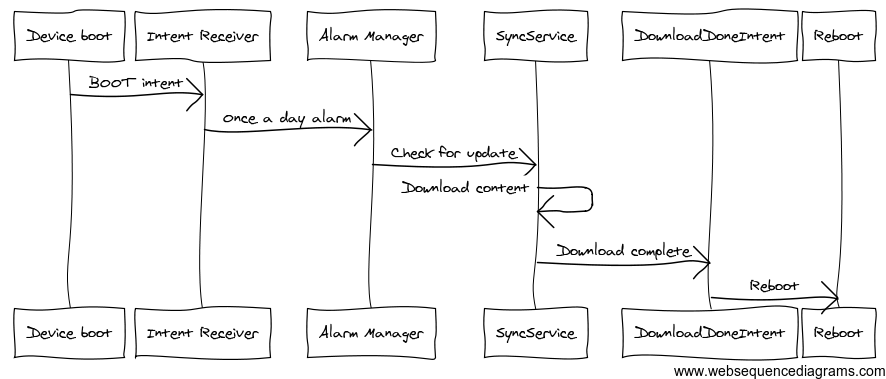
<p>Similarly to the update service above, the Content Syncing part is also a separate app without a GUI, it gets started on RECEIVE_BOOT_COMPLETED intent and checks for updated content once a day. We download a pretty large amount of data which can range anywhere from 100MB-1GB. Below is the sequence diagram of the rough architecture that we have:</p>

<p><img src="http://arnab.ch/images/content-sync-sequence-diagram.png" alt="Content Sync Sequence Diagram" /></p>

<p>Once the download sync is complete, the app sends an Intent notifying the Main homescreen application about the content update so that it can display a friendly message to the user in case the device content is being used/played at that time. The main app stores some of the data in memory or in a SQLite database when it starts, so in order to cleanly rebuild that entire data structure we&#8217;re currently rebooting the device. But in future <em>we&#8217;re planning to avoid it, so that the content update does not need a reboot</em>.</p>

<h2>Conclusion</h2>

<p>This project has helped us gain a lot of valuable knowledge and insight into the Android platform and development practices as a whole. It has been a tremendous learning exercise for all of us. Even though the project is nearing completion, there are still some cases where we can optimize a bit, for example if you have gone through the above diagrams then you may have realized that the flows can be simplified even further by introducing <strong>Android Push Messaging (C2DM)</strong>, this we&#8217;ll do sometime in later months, and as we already have the provisioning server in place then it&#8217;s just a matter of time that we develop the feaures and push it to the wild.</p>

<p>On a closing note, if you want to build an app like this, then you can get in touch with us at <a href="&#109;&#x61;&#x69;&#108;&#116;&#111;&#x3a;&#98;&#x69;&#122;&#64;&#113;&#x75;&#x61;&#x64;&#110;&#111;&#x64;&#x65;&#x2e;&#99;&#111;&#109;">&#98;&#x69;&#x7a;&#x40;&#x71;&#x75;&#97;&#100;&#x6e;&#x6f;&#100;&#x65;&#46;&#99;&#111;&#109;</a>, we&#8217;d be happy to help you.</p>

<p>Thanks for reading!</p>
]]></content>
  </entry>
  
  <entry>
    <title type="html"><![CDATA[PhoneGap - How does it work]]></title>
    <link href="http://arnab.ch/blog/2011/12/phonegap-how-does-it-work/"/>
    <updated>2011-12-05T00:47:00+05:30</updated>
    <id>http://arnab.ch/blog/2011/12/phonegap-how-does-it-work</id>
    <content type="html"><![CDATA[<h2>Introduction</h2>

<p>PhoneGap is an open-source cross-platform Mobile Application development framework by Nitobi Software (now Adobe) which allows web developers to build mobile apps using HTML, CSS and JavaScript.</p>

<p>The PhoneGap project has been moved to Apache Incubator and now it is known as &#8220;Apache Callback&#8221;. PhoneGap project is divided into several sub-projects where each one represents a separate platform. In order to develop for iPhone and iPad, you need Mac OSX and XCode installed, similarly for Android you need Google Android SDK, Eclipse ADT Plugin, Ant as well as Eclipse IDE.</p>

<p>The official project detail can be found here <a href="http://incubator.apache.org/projects/callback.html" title="Apache Calback/PhoneGap">Apache Callback</a>. It is currently hosted in GitHub and once the Apache infrastructure is ready it will be moved there.</p>

<!--more-->


<h2>Supported Platforms</h2>

<p>PhoneGap supports several mobile platforms, which enables web developers to write code using their existing HTML/JS skills and deploy to multiple platforms:</p>

<ul>
<li>iOS (iPhone/iPad)</li>
<li>Android</li>
<li>Symbian</li>
<li>BlackBerry</li>
<li>WebOS (most likely dead - go blame HP)</li>
<li>WP7</li>
<li>Samsung Bada</li>
</ul>


<p>The environment setup for each of the above mentioned platforms can be found in <a href="http://phonegap.com/start/" title="Getting Started with PhoneGap">&#8220;Getting Started&#8221;</a>.</p>

<h2>Architecture</h2>

<p>PhoneGap is not a &#8220;native application development&#8221; framework, even though it provides access through several device features using an abstraction layer, which otherwise are inaccessible to a normal webpage. In simple words, it provies a &#8220;WebView&#8221; with extended capabilities. Using PhoneGap one can access the following device features:</p>

<ul>
<li>Camera</li>
<li>Geolocation</li>
<li>Compass</li>
<li>Contacts</li>
<li>Media</li>
<li>Accelerometer</li>
<li>Network</li>
<li>Notification</li>
<li>Storage</li>
<li>Filesystem</li>
<li>etc&#8230;</li>
</ul>


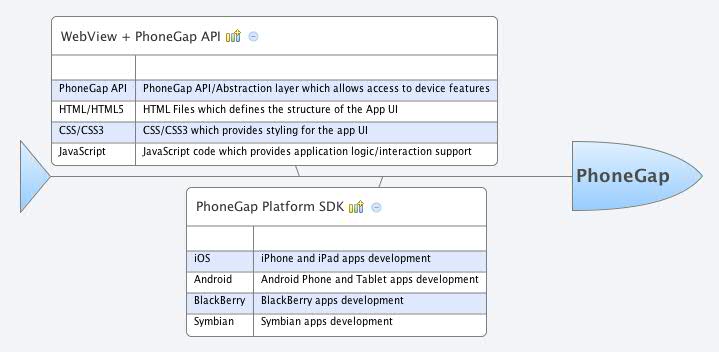
<p>The following diagram explains how does a PhoneGap architecture look like:</p>

<p><img src="http://arnab.ch/images/phonegap-architecture.jpg" alt="PhoneGap Architecture" /></p>

<p>In the above dialogram we can see that PhoneGap provides a &#8220;WebView&#8221; which is nothing but a bare bone web browser without a Chrome UI. The native code in PhoneGap SDK exposes uniform APIs across multiple device platforms which are accessible to JavaScript running inside the WebView.</p>

<p>As a web developer if you are using PhoneGap then it&#8217;s less likely that you&#8217;ll need to know the internals of the SDK (although it is always recommended to go through the source code in case you want to enlighten yourself as well as get fascinated by the tremendous efforts that the PhoneGap developers have put into it)</p>

<h2>How to approach PhoneGap development</h2>

<p>Even though you&#8217;re using HTML/CSS and JavaScript to develop applications, remember that it&#8217;s not a traditional desktop browser environment and the user experience pattern is significantly different. The PhoneGap apps are downloadable from App Store, so user might not know(or they don&#8217;t even care) that your app is built using PhoneGap or HTML/CSS, it&#8217;s always a good practice to be consistent with the platform UI guidelines so that you don&#8217;t confuse your users. A simple example could be if you&#8217;re developing a PhoneGap app for Android then be sure to handle the hardware/software(ICS) &#8220;back key&#8221;, if you don&#8217;t do that then your users might get confused.</p>

<p>Another important factor is handling scaling and device orientation, you should always make sure that your app looks proper in both Portrait and Landscape orientations.</p>

<p>The recommended way to start PhoneGap development is below:</p>

<ul>
<li>Setup environment for the target platform for example iOS/Android etc, see <a href="http://phonegap.com/start/">Getting Started</a>.</li>
<li>Run the sample app provided with the PhoneGap SDK.</li>
<li>Go though the <a href="http://docs.phonegap.com/" title="PhoneGap API Documentation">API Documentation</a>.</li>
<li>Try creating sample apps of your own using each of the device features available through the PhoneGap API.</li>
<li>Once you are familiar with PhoneGap, try creating a sample app which uses multiple device APIs, you can try using jQuery Mobile, Sencha, Jo HTML5 Mobile App or jQTouch) to build the Phone like user interface.</li>
</ul>


<h2>Limitations</h2>

<p>PhoneGap as development platform is very attractive and promises to bring uniformity across several mobile platforms. It aims to become a de facto mobile application development framework using HTML5 based technologies. But as said above the capabilities offered by the framework is limited to what a &#8220;WebView&#8221; can do. The following are a list of things to watch out for:</p>

<ul>
<li>In iOS the WebView is not JIT enabled (however the actual iPhone browser is), which means the JS code can&#8217;t take advantage of the engine optimizations which are otherwise available to actual browser of the device.</li>
<li>In Android the CSS rendering in WebView is not as par with iOS, the rounded corners often look jagged.</li>
<li>The WebView runs with limited amount of memory, be sure to optimize your JS code so that it doesn&#8217;t cause trouble.</li>
<li>If you are developing for multiple platforms, make sure that you&#8217;re aware of the capabilities available in that platform, for example - in latest iOS you can use WebSocket but in Android it&#8217;s not yet available (not confirmed in ICS though).</li>
<li>PhoneGap has good support from BlackBerry 6.0+ (with WebWorks SDK), phones with older BlackBerry versions may not work as expected.</li>
</ul>


<h2>Security</h2>

<p>As your app runs inside WebView (aka a browser), you should not allow untrusted third-party code to execute in the page, because this can compromize the security, the JS code downloaded from internet will suddenly have access to several device features that they can make substantial damage to user&#8217;s privacy and security. Do not load an iFrame in your app, or redirect to some other websites when the app is loaded, as this will likely get your app rejected in Apple app store, beacuse Apple does not like applications opening public websites inside the app as it makes it difficult or almost impossible to enforce policies regarding content.</p>

<h2>Resources</h2>

<p>The following resouces can be useful for HTML5 based mobile apps development (not all are related to PhoneGap):</p>

<ul>
<li><a href="http://jquerymobile.com">jQuery Mobile</a></li>
<li><a href="http://joapp.com">Jo HTML5 App Framework</a></li>
<li><a href="www.sencha.com/products/touch">Sencha Touch - Commercial</a></li>
<li><a href="http://jqtouch.com">jQTouch</a></li>
<li><a href="http://appmobi.com">AppMobi</a></li>
<li><a href="http://dhtmlx.com/touch/">DHTMLX Touch</a></li>
<li><a href="http://www.nimblekit.com/">NimbleKit - iOS only Commercial</a></li>
<li><a href="http://www.the-m-project.org/">The M-Project</a></li>
<li><a href="http://www.winktoolkit.org/">Wink Toolkit</a></li>
<li><a href="http://zeptojs.com">Zepto.js - JavaScript library for Webkit browsers</a></li>
<li><a href="http://documentcloud.github.com/backbone/">Backbone.JS - JavaScript MVC framework</a></li>
</ul>


<h2>Conclusion</h2>

<p>PhoneGap provides an opportunity to a vast pool of web developers reusing their existing skills to develop applications for mobile phones, which in future is going to be one of the most important medium to access information and content in internet. As the phones become more powerful, the new capabilities will be available in your arsenal. The recent developments in HTML5 based technologies also usher a new change in this segment. Do not miss the bus and keep exploring PhoneGap.</p>
]]></content>
  </entry>
  
</feed>